Ngrok Explained: Securely Publish Your Localhost
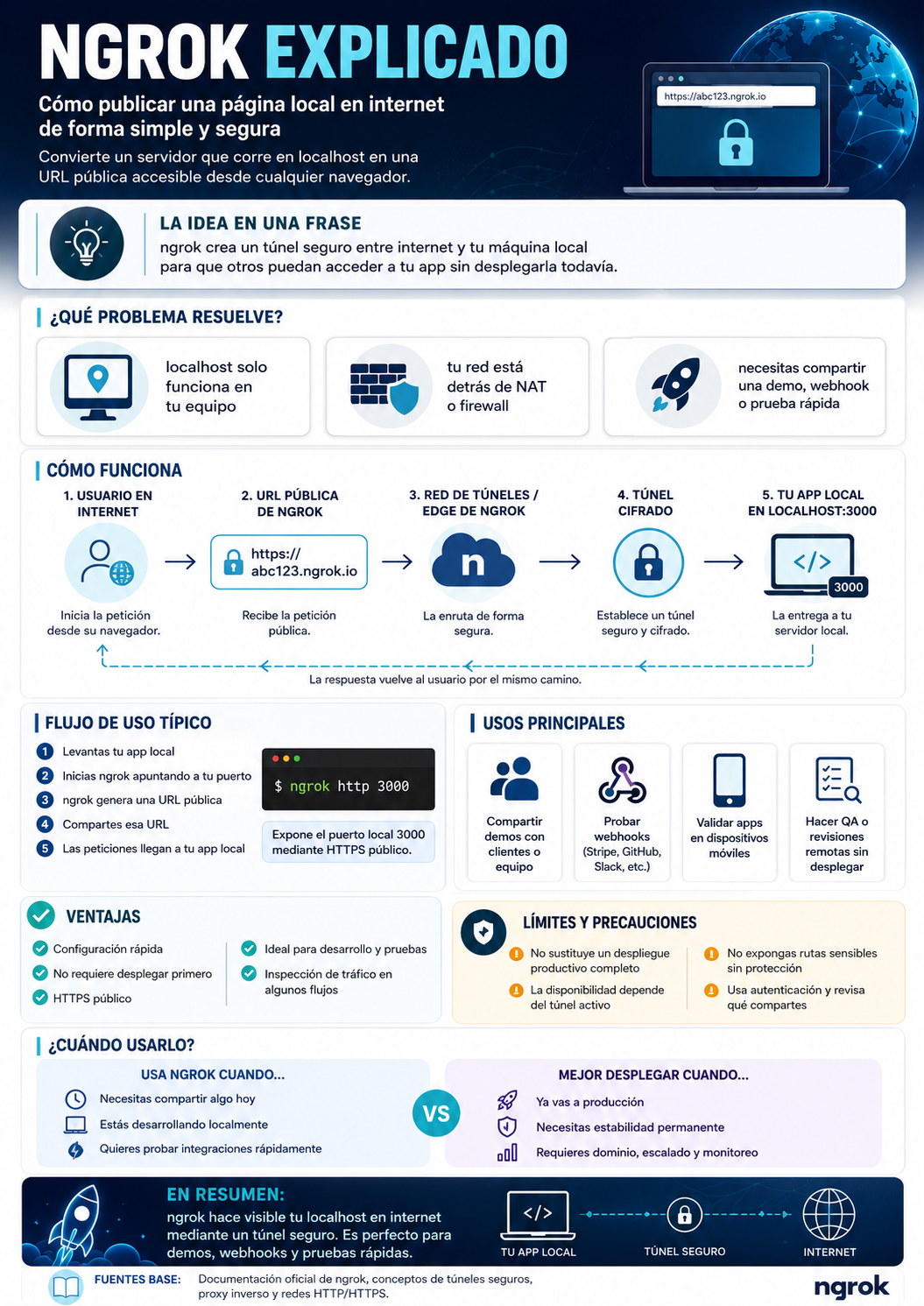
An infographic in Spanish that summarizes what ngrok is, how it creates an encrypted tunnel from a public URL to your local app, its typical workflow, uses, advantages, limitations, and when it’s better to use it instead of a deployment.
- Complexity
- Introductory
- Reading
- 5 min read
- Published
While the image is fitted, the left and right arrows move to the previous and next infographic. Once it is zoomed in, the arrows move the image instead. The plus and minus keys zoom, and the zero key fits it again.
Loading the image…
About this infographic
Editorial Summary: - Main idea: ngrok creates a secure tunnel between the internet and your local machine to access an app without deploying it. - Problems it addresses: localhost only works on your own computer; networks behind NAT/firewalls; the need to share demos, webhooks, or quick tests. - How it works (high level): 1) user initiates a request → 2) ngrok’s public URL receives the request → 3) ngrok’s tunnel/edge network securely routes it → 4) an encrypted tunnel is established → 5) the local app at localhost:3000 responds; the response travels back along the same path. - Typical usage flow: Start your app, launch ngrok pointing to the port, an HTTPS public URL is generated, share the URL, and traffic reaches your app. Example command: "ngrok http 3000". - Main uses: sharing demos; testing webhooks (Stripe, GitHub, Slack, etc.); validating on mobile devices; QA/remote reviews without deployment. - Advantages: quick setup; no deployment required; public HTTPS; useful for development/testing; traffic inspection possible in some workflows. - Limitations/precautions: does not replace a production deployment; depends on the tunnel being active; do not expose sensitive routes; review what is being shared. - When to use it? For sharing today, local development, and test integrations. When to deploy? Production, long-term stability, domain, scaling, and monitoring.
Key takeaways
- Ngrok lets you share a local app without deploying it by creating a secure tunnel between the internet and your machine.
- This is useful when localhost is behind a NAT or firewall and you need to share demos or quick tests.
- Technical flow: user → ngrok public URL → tunnel network → encrypted tunnel → local app; the response returns along the same path.
- Typical use: Run the app, start ngrok on the port, get the HTTPS URL, and share it; traffic is then routed to the app.
- Use cases: demos, webhook testing, mobile validation, and QA/remote testing.
- Advantages: quick setup, public HTTPS, no prior deployment required, and traffic inspection options.
- Limitations: Does not replace production; depends on the active tunnel; avoids exposing sensitive routes; review what is shared.
- Use it for development and testing; deploy it when you need production, stability, control, and monitoring.