Vector Databases: What They Are, How They Work, and Examples
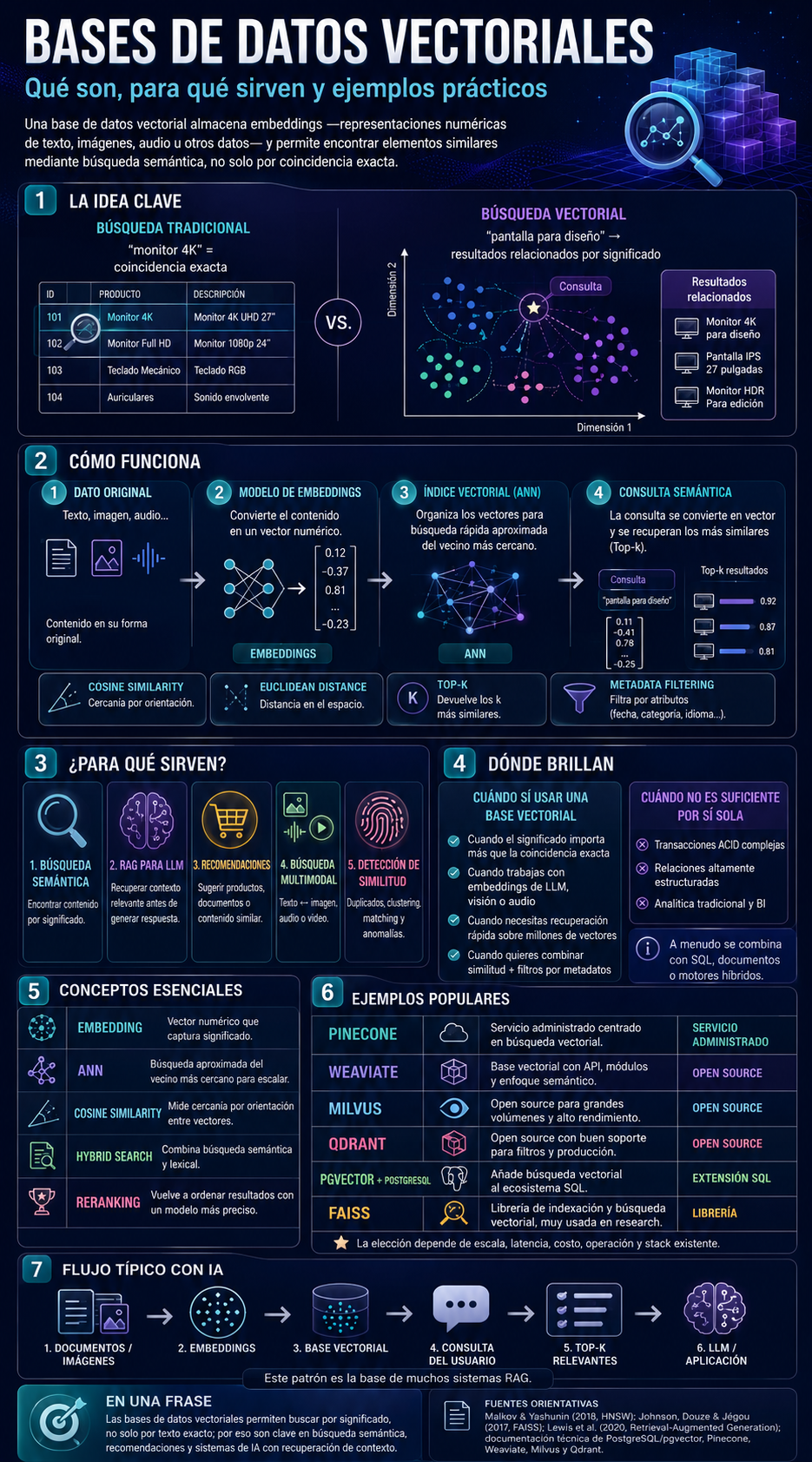
An infographic in Spanish that summarizes the concept of vector databases, their workflow with embeddings and ANNs, use cases, limitations, and popular tools.
- Complexity
- Intermediate
- Reading
- 5 min read
- Published
While the image is fitted, the left and right arrows move to the previous and next infographic. Once it is zoomed in, the arrows move the image instead. The plus and minus keys zoom, and the zero key fits it again.
Loading the image…
About this infographic
The article explains that vector databases store embeddings to search by meaning rather than exact match. It contrasts traditional search with vector search and outlines a four-step workflow: converting content into embeddings, indexing it with an ANN, and running semantic queries to retrieve the top-k most similar results, with the option to filter by metadata. It includes common metrics (cosine similarity and Euclidean distance) and mentions typical use cases: semantic search, RAG for LLMs, recommendations, multimodal search, and similarity detection. It explains when these methods excel (when meaning matters, with LLMs, at scale, or when combining similarity and filters) and when they are not sufficient on their own (complex ACID transactions, highly relational data, and traditional BI analytics). It defines key concepts such as embedding, ANN, hybrid search, and reranking. It provides examples of solutions: Pinecone (managed service), Weaviate, Milvus, and Qdrant (open source), pgvector for PostgreSQL (SQL extension), and FAISS (library). It concludes with a typical RAG pattern: documents → embeddings → vector space → query → Top-k → LLM/application.
Key takeaways
- A vector basis allows you to search by meaning using embeddings.
- The typical workflow: create embeddings → index using an ANN → retrieve Top-k → apply filters/re-evaluation.
- Common metrics: cosine similarity and Euclidean distance.
- Use cases: semantic search, RAG, recommendations, multimodality, and similarity detection.
- They do not replace relational/ACID systems or traditional BI; they are typically used in conjunction with SQL and metadata.
- Tools mentioned: Pinecone, Weaviate, Milvus, Qdrant, pgvector/PostgreSQL, and FAISS.